Roles & Permissions
- How roles work
- The default roles
- All permissions explained
- Creating or changing a role
- Actions kept for the owner
How roles work
A role is a named set of permissions. Each permission allows one kind of action, such as "Record payments" or "Create & edit job cards". You give each user one or more roles; the user can then do everything any of their roles allows.
The sidebar only shows menus a user has permission for, so each person sees a simple screen with just what they need.
The default roles
MotoDesk comes with five ready-made roles that suit most showrooms:
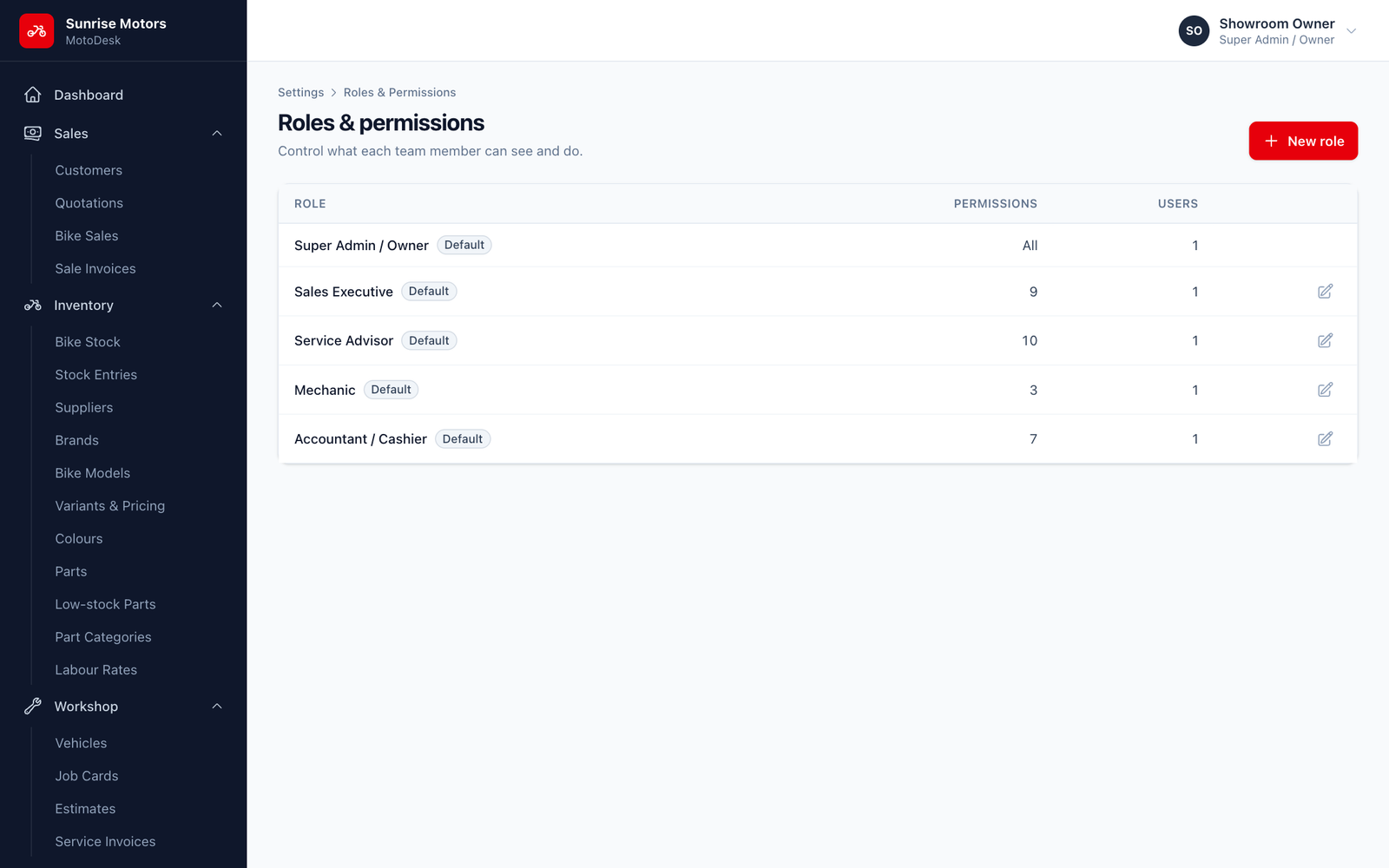
| Role | Typical person | What they can do |
|---|---|---|
| Super Admin / Owner | Owner, manager | Everything, including settings, users, audit log and login activity. |
| Sales Executive | Showroom sales staff | Dashboard; view bike stock; view and manage customers; view, create and edit sales; view invoices and payments. |
| Service Advisor | Workshop reception | Dashboard; view and manage customers and vehicles; view and create job cards; update service status; manage estimates; view parts; view and create invoices. |
| Mechanic | Workshop technicians | See only the job cards assigned to them, update their status and view parts. |
| Accountant / Cashier | Cash counter, accounts | Dashboard; view customers and sales; view invoices; view and record payments; view reports. |
All permissions explained
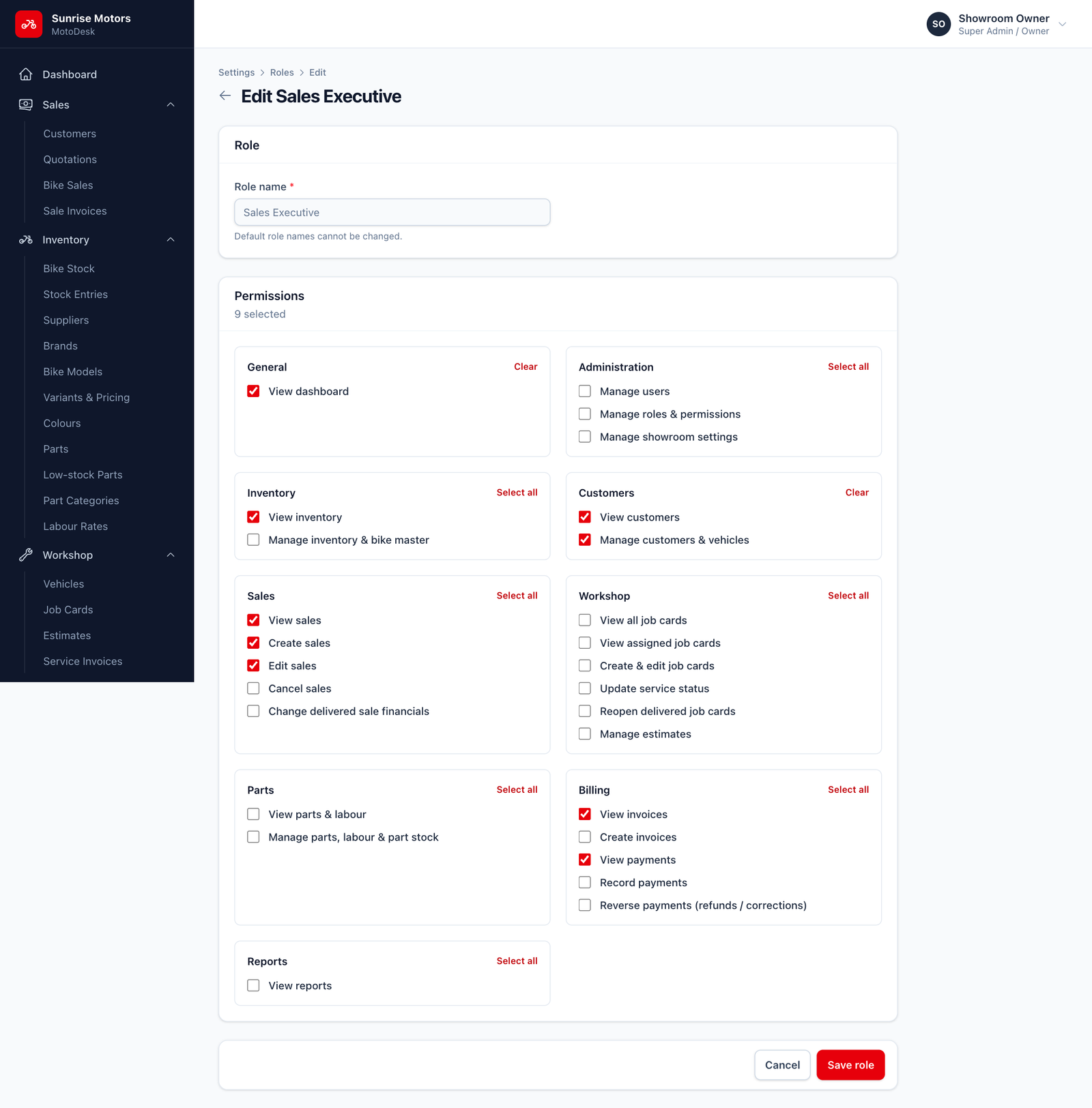
| Group | Permission | Allows the user to… |
|---|---|---|
| General | View dashboard | See the dashboard summary cards. |
| Administration | Manage users | Add, edit and deactivate staff accounts. |
| Manage roles & permissions | Create and change roles. | |
| Manage showroom settings | Change showroom details, tax and numbering. | |
| Inventory | View inventory | See bike stock and the bike catalogue. |
| Manage inventory & bike master | Receive bikes, change stock status, edit brands, models, variants, colours and suppliers. Also shows purchase cost prices. | |
| Customers | View customers | See customers and vehicles. |
| Manage customers & vehicles | Add and edit customers and their vehicles. | |
| Sales | View sales | See sales and quotations. |
| Create sales | Make quotations, confirm sales and mark them delivered. | |
| Edit sales | Change confirmed sales. | |
| Cancel sales | Cancel confirmed sales. | |
| Change delivered sale financials | Edit or cancel a sale after delivery. | |
| Workshop | View all job cards | See every job card. |
| View assigned job cards | See only the job cards assigned to you (for mechanics). | |
| Create & edit job cards | Open job cards and edit their parts and labour. | |
| Update service status | Move jobs through the service stages. | |
| Reopen delivered job cards | Move a delivered job back to work in progress. | |
| Manage estimates | Create estimates and record the customer's decision. | |
| Parts | View parts & labour | See parts and labour rates. |
| Manage parts, labour & part stock | Add parts, adjust stock and change labour rates. Also shows part purchase cost. | |
| Billing | View invoices | See sale and service invoices. |
| Create invoices | Generate and cancel service invoices. | |
| View payments | See receipts and outstanding dues. | |
| Record payments | Take payments against sales and service invoices. | |
| Reverse payments (refunds / corrections) | Reverse a payment that was recorded by mistake or refunded. | |
| Reports | View reports | Open all reports and export them. |
Creating or changing a role
- Open Settings › Roles & Permissions.
- Click New role, or Edit on an existing role.
- Enter a Role name and tick the permissions you want. The counter shows how many are selected.
- Click Create role (or Save role).
Rules:
- The Super Admin role cannot be edited. It always has every permission.
- Default role names cannot be changed, but you can change their permissions.
- Default roles cannot be deleted.
- A role that is still given to any user cannot be deleted. Move those users to another role first.
Actions kept for the owner
By default, only the Super Admin / Owner can:
- Reverse payments
- Cancel sales
- Edit or cancel a sale after delivery
- Reopen a delivered job card
- See the Audit Log and Login Activity
This protects your money and records. You can give the first four to a trusted manager by adding the permissions to their role. Audit Log and Login Activity are always Super Admin only.